Browse the docs
Self-hosting
Machines and CI in your network
Install and update the crunu agent from your on-premises server, trust your company's certificate authority, and run CI jobs with a binary from the bundle.
Last updated
On this page
An on-premises server hosts the signed agent releases at its own address, https://vault.kiteline.example/releases/. Machines install and update the agent from there, and CI runners use a binary from the bundle, so none of them needs the internet.
Available from Crunu 6.3.0. Read Install Crunu in your own network and TLS and the root certificate first.
A machine that has the bundle
The installer prints a command for a machine that has the bundle directory, or a copy of its releases/<version>/ directory. It checks install.sh of that directory against its signed SHA-256, installs crunu from the directory with no download, and enrolls the machine. Pass the enrollment code from the web app on standard input:
echo '<sha256>  /opt/…/releases/6.3.0/install.sh' | sha256sum -c - \
  && printf '%s\n' 'crunu_enr_…' | sudo sh /opt/…/releases/6.3.0/install.sh \
    --version 6.3.0 --base-url https://vault.kiteline.example/releases/6.3.0 \
    --from-dir /opt/…/releases/6.3.0 --sha256 amd64=<sha256> --sha256 arm64=<sha256> \
    --ca-file /opt/…/deploy/crunu-root.crt --server https://vault.kiteline.example --enroll -
Use the command exactly as the installer printed it: it carries the real checksums.
Any other machine of the network
In the web app, open Machines and choose Connect machine. The dialog shows the command that downloads the agent from your server. Tick the server uses a company certificate when the server's certificate comes from the internal certificate authority or from your company. The command then carries --ca-file /path/to/ca.pem, and the download of the installer from your server trusts that file too. Put the root certificate on the machine and replace every /path/to/ca.pem in the command with its path.
The code in the dialog is single-use and is shown once. Approve the machine in the web app after you compare its fingerprint.
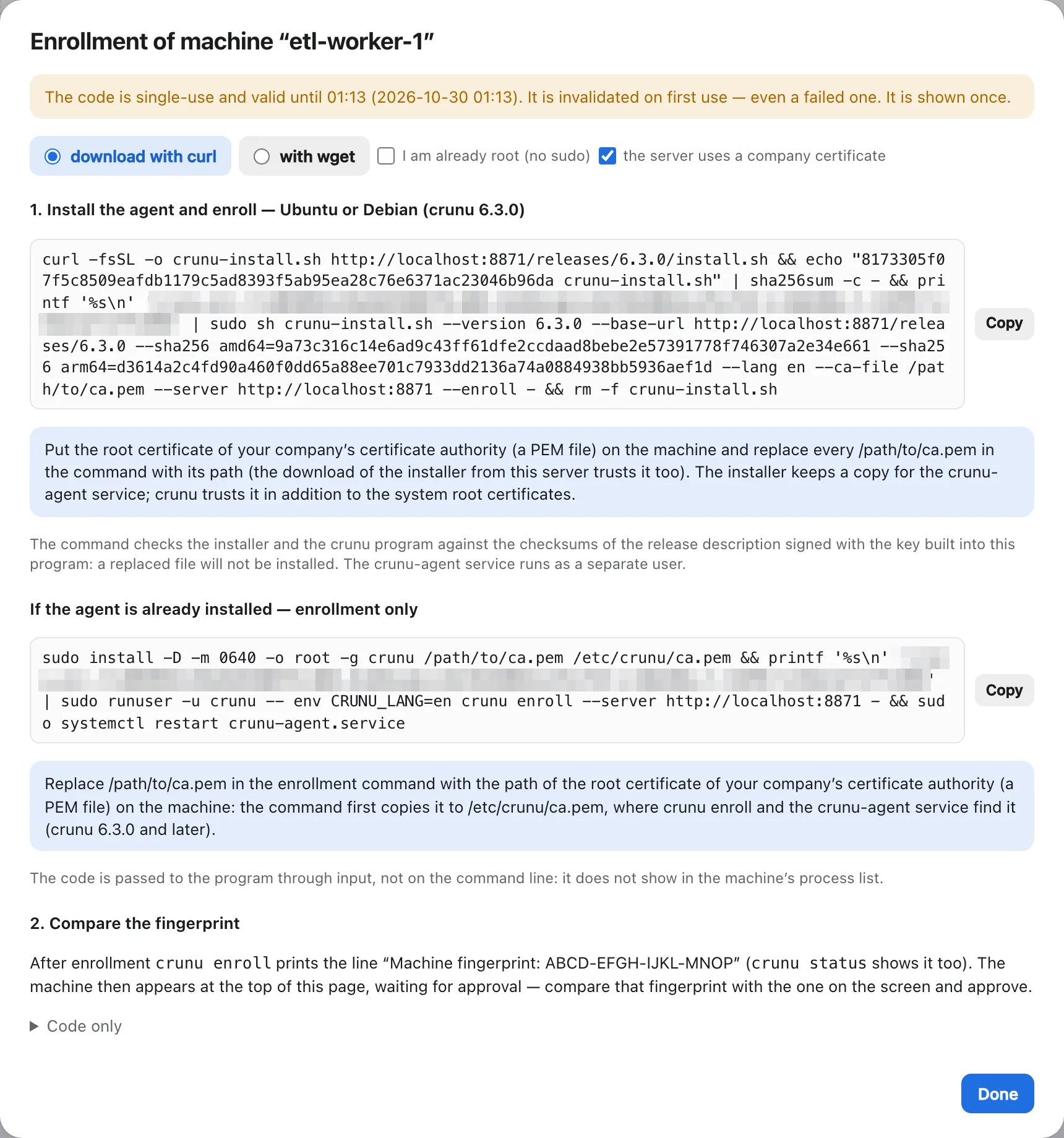
With --ca-file, the agent installer writes:
| File | What it is |
|---|---|
/etc/crunu/ca.pem | a copy of the root certificate, 0640 root:crunu; crunu commands run by hand find it there |
/etc/systemd/system/crunu-agent.service.d/ca.conf | Environment=CRUNU_CA_FILE=/etc/crunu/ca.pem for the agent service |
/etc/crunu/releases-url | the release directory of your server, for crunu self-update |
The company certificate is trusted in addition to the system roots. A download through BusyBox wget can't add it; use curl.
An agent that's already installed
The .deb package is in releases/<version>/ too. Install it with sudo dpkg -i, then use the enrollment-only command the dialog shows for an agent that's already installed. With the server uses a company certificate ticked, that command first copies the certificate to /etc/crunu/ca.pem and restarts the service after enrolling. A .deb install is updated with dpkg, not with crunu self-update.
Update the agents from your server
After you move the server to a new bundle, update each machine:
sudo crunu self-update
sudo systemctl restart crunu-agent
crunu self-update takes the release directory from /etc/crunu/releases-url and trusts /etc/crunu/ca.pem, so it updates from your server. The service never updates itself.
People on their computers
People sign in from their own computers with the root certificate:
crunu login --server https://vault.kiteline.example --ca-file crunu-root.crtcrunu login keeps the file for this server, so later commands such as crunu unlock find it. CRUNU_CA_FILE works as well. The order in which commands look for the file: the --ca-file option, CRUNU_CA_FILE, the file crunu login kept, caFile in /etc/crunu/agent.json, then /etc/crunu/ca.pem.
CI in the network
A runner without access to the release directory uses a crunu binary that's already in its image, taken from releases/<version>/ of the bundle. Check it against SHA256SUMS before you add it to the image.
| Integration | Binary | Root certificate |
|---|---|---|
| GitHub Actions | input crunu-bin | CRUNU_CA_FILE in the step or job env |
| GitLab CI template | variable CRUNU_BIN | variable CRUNU_CA_FILE |
| Bitbucket pipe | variable CRUNU_BIN | variable CRUNU_CA_FILE |
With a ready binary, nothing is downloaded during the job; the version is still checked. An example GitLab job:
include:
  - local: ci/crunu.gitlab-ci.yml

deploy:
  image: registry.kiteline.example/node:24
  extends: .crunu
  variables:
    CRUNU_BIN: /opt/crunu/bin/crunu
    CRUNU_CA_FILE: /opt/crunu/crunu-root.crt
  script:
    - crunu run --env payments-api/staging -- ./deploy.sh
A service token works without any outgoing request from the server. A CI binding with OIDC works only with an issuer the server can reach: a CI system inside your network, allowed in OUTBOUND_ALLOW. Cloud CI issuers are on the internet, so an isolated server refuses them unless you allow their host. See Isolated mode and allowed hosts and OIDC binding.